No desk certainty
Employees can lose productive time walking the office or asking which workspace is available.
A DESK READY FOR EVERY OFFICE DAY
Give employees a simple way to reserve a desk before coming to the office. Manage shared workspaces from one place and make office attendance more predictable.
One clear desk-booking view for employees and administrators
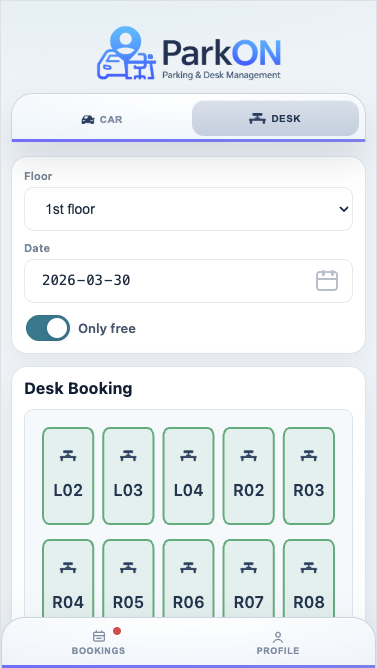
A CLEARER START TO THE WORKDAY
When office attendance changes every day, permanent seating and informal desk claims stop matching the way people work. Employees arrive without knowing where they can sit, while workplace teams coordinate desks through messages, spreadsheets and repeated questions.
Employees can lose productive time walking the office or asking which workspace is available.
Personal items, chat messages and unwritten habits make shared seating confusing and difficult to manage fairly.
A permanent desk can remain empty whenever its assigned employee works remotely or is away.
ONE PLACE. ONE CURRENT VIEW.
ParkON brings desk availability, employee reservations and administrator controls into the same workplace system. Employees choose a date, open the relevant desk floor and reserve a specific available workspace. Administrators configure floors and desks, manage user access, set the advance-booking window and see reservations in one place.
HOW PARKON WORKS
Three clear steps. No side spreadsheets or message threads.
The employee selects the date they plan to work from the office.
ParkON shows the desk floor and workspaces available for that date.
The employee confirms a specific desk. The reservation remains visible and can be released if plans change.
BUILT AROUND THE WORKDAY
A shared desk booking system gives employees a predictable place to work and gives workplace teams a current view of how office seating is reserved.
A confirmed reservation replaces competing informal claims for the same workspace.
Different employees can use the same desks on different office days without permanent assignments.
Employees check availability and book for themselves instead of asking an administrator.
Named desks, floors and booking records help the digital view reflect the workplace.
A PRACTICAL EXAMPLE
A company has 80 employees, but only around 45 people are typically in the office on the same day. Instead of maintaining 80 permanently assigned desks, the company creates a shared workspace. Employees reserve a desk only when they plan to work onsite, giving each person more certainty without requiring a desk for every employee every day.
GOOD QUESTIONS
Want to see the workflow yourself?
Open the ParkON demo
An office desk booking system lets employees see shared workspace availability and reserve a desk for the date they plan to attend. Administrators manage the desks, access and booking rules behind that employee experience.
Yes. Employees can choose a future date, view available desk spaces and reserve a specific desk before they travel to work.
Yes, particularly where attendance varies. A shared booking system helps different employees use the same desk capacity on different days, as long as the company’s workplace policy supports that arrangement.
Yes. Desk reservations are especially useful when employees work onsite on different days and permanent desk assignments leave space unused. ParkON also has a dedicated hybrid office desk booking overview.
YOUR DESK. READY.
See how ParkON fits your shared workspace.