The morning desk hunt
Employees arrive first and discover availability later, adding friction to the start of an office day.
HOT DESKING WITHOUT THE GUESSWORK
Make hot desking predictable. Let employees reserve available desks before they arrive instead of searching for a free workspace when they get to the office.
The flexibility of hot desking with a clear plan
FLEXIBLE SHOULD STILL FEEL ORGANIZED
Hot desking removes fixed seating, but without a reservation system it can replace one rigid model with daily uncertainty. Popular desks are claimed informally, belongings become placeholders and employees spend time walking the floor instead of starting work.
Employees arrive first and discover availability later, adding friction to the start of an office day.
Without a current booking view, several people may expect to use the same desk or part of the office.
Chat posts and spreadsheet rows make it difficult to know which desk information is current.
ONE PLACE. ONE CURRENT VIEW.
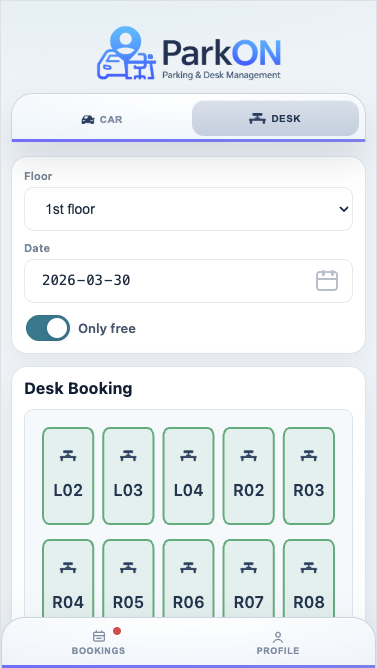
Hot desking is the workplace model; ParkON provides the booking workflow that makes the model predictable. An employee plans an office day, opens the desk floor, sees available workspaces and reserves a specific desk. The booking is then visible in the system, and the employee can release it when plans change.
HOW PARKON WORKS
Three clear steps. No side spreadsheets or message threads.
The employee opens ParkON and selects the day they will be in the office.
Available workspaces are shown on the selected desk floor in a list or map view.
The chosen desk is reserved and visible, giving the employee a clear destination for the day.
BUILT AROUND THE WORKDAY
A lightweight booking step keeps shared seating open and flexible while giving employees the confidence that a workspace will be ready for them.
Employees know which desk they will use before entering the office.
Reservations replace belongings, messages and unwritten rules as the way to hold a desk.
A current availability view helps the team use desks across the office more consistently.
Employees handle routine reservations themselves while administrators retain oversight.
A PRACTICAL EXAMPLE
A flexible office has 36 hot desks across two areas. Employees previously arrived early to secure preferred workspaces or posted requests in a team channel. With ParkON, each employee can choose the date, check the available desk floor and reserve a specific workspace before travelling. Everyone uses the same current view rather than relying on informal claims.
GOOD QUESTIONS
Want to see the workflow yourself?
Open the ParkON demo
Hot desk booking software shows shared desk availability and lets employees reserve a workspace for an office day. It gives structure to a seating model where desks are not permanently assigned.
Hot desking is the workplace model in which desks are shared. Desk booking software is the system employees use to see availability and reserve one of those shared workspaces.
Yes. ParkON lets employees select a future date and reserve an available desk within the advance-booking window configured by the administrator.
It can be. When different employees attend on different days, shared desks can match variable attendance more closely than blanket permanent assignments. A booking system helps keep that flexibility predictable.
YOUR DESK. READY.
See how ParkON fits your shared workspace.