Information falls out of date
Static rows and messages do not provide one dependable view as workplace plans change.
WORKPLACE RESERVATIONS, MADE CLEAR
Replace spreadsheets, chats and informal desk claiming with a simple workspace reservation system for employees.
Built for internal office desks—not a public rental marketplace
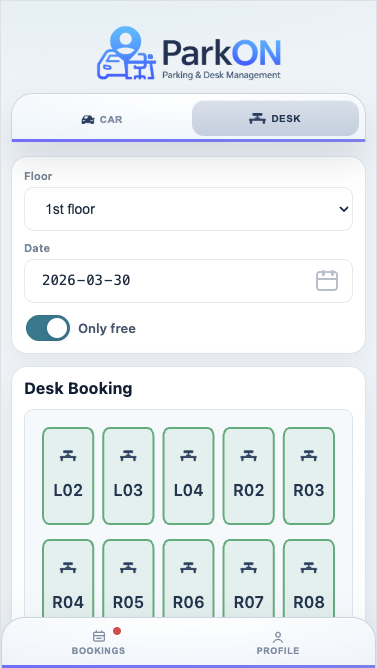
A LIVE SYSTEM BEATS A STATIC LIST
Manual reservation sheets and chat requests become unreliable as employees book, change and release desks. People stop knowing which record is current, and workplace administrators become the connection point for every routine question about availability.
Static rows and messages do not provide one dependable view as workplace plans change.
Email-based desk requests create unnecessary review, recording and confirmation work.
A generic list does not organize workspaces by desk floor or show the place an employee is choosing.
ONE PLACE. ONE CURRENT VIEW.
ParkON is workplace reservation software for companies, offices, hybrid teams and organizations using hot desking. Employees choose a date, see available desks and reserve a specific workspace. Administrators configure desk floors and spaces, manage access and review reservations. It is not a consumer desk-rental or coworking marketplace.
HOW PARKON WORKS
Three clear steps. No side spreadsheets or message threads.
Administrators add desk floors and individual workspaces that reflect the office.
Staff choose a date, compare available desks and select the workspace they need.
Employees can review or release bookings while administrators retain a complete reservation view.
BUILT AROUND THE WORKDAY
Useful desk reservation software needs to be quick for an employee making one booking and structured enough for administrators managing the wider shared workplace.
Connect each reservation directly to an employee, date, desk and current status.
Employees see the workspaces available for the selected office day before they arrive.
Shared desk reservations can work alongside permanent seating where a mixed approach is appropriate.
Self-service booking gives employees the information and action they need in one place.
A PRACTICAL EXAMPLE
An office team currently tracks 60 flexible desks in a spreadsheet. Employees send messages to request a place, and the administrator updates cells by hand. With ParkON, those desks are configured as bookable workspaces. Employees make their own reservations for future office days, and both sides use the same current booking record.
GOOD QUESTIONS
Want to see the workflow yourself?
Open the ParkON demo
Desk reservation software lets employees view workspace availability and reserve an office desk for a chosen date. It also gives administrators the controls needed to organize desks and oversee bookings.
Companies with shared desks, hybrid teams, flexible offices and workplace teams managing hot desking use desk reservation software to make seating easier to plan.
Yes. ParkON provides a current booking workflow tied to employees, dates and specific desks, so the same reservations do not need to be coordinated separately in a spreadsheet.
ParkON is aimed primarily at internal employee workspace reservations rather than selling public coworking access or listing desks in a consumer marketplace.
YOUR DESK. READY.
See how ParkON fits your shared workspace.