Changing attendance
The people onsite and the number of desks they need vary throughout the week.
DESKS THAT FOLLOW THE HYBRID WEEK
Hybrid work changes office attendance every day. Let employees reserve desks only when they plan to come in, so shared workspace is easier to manage.
Flexible seating for changing daily attendance
WHEN THE OFFICE CHANGES DAY BY DAY
Hybrid attendance has a different shape each day. One part of the office may be quiet on Monday and busy on Wednesday, while assigned desks sit empty whenever their owners work elsewhere. Unmanaged hot desking avoids assignments but leaves employees unsure where they will work.
The people onsite and the number of desks they need vary throughout the week.
Assigned workspaces remain unavailable to others even when their regular users are remote.
Without advance desk reservations, employees discover seating pressure only after they arrive.
ONE PLACE. ONE CURRENT VIEW.
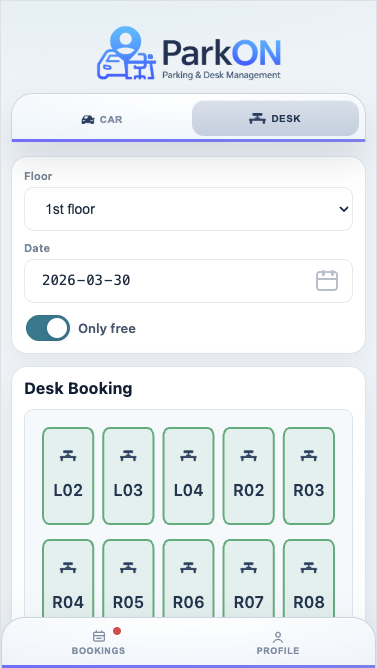
ParkON lets employees reserve a desk for the specific days they plan to work onsite. Availability reflects existing reservations, and released bookings return desks to the shared pool. Administrators configure desk floors, workspaces, user access and advance-booking rules while employees get a simple self-service experience.
HOW PARKON WORKS
Three clear steps. No side spreadsheets or message threads.
An employee decides when they will work from the office and selects that date in ParkON.
They see the available desks for that day and choose a specific place to work.
The booking stays visible and can be released, returning the desk to the shared pool.
BUILT AROUND THE WORKDAY
Desk booking helps a workplace respond to variable attendance without promising unsupported savings or forcing every role into the same seating policy.
Shared reservations help available desks serve the employees who are actually onsite that day.
Workspaces can be used across the week instead of remaining tied to someone working remotely.
People can confirm where they will sit while they are planning the rest of their office day.
A visible booking process makes flexible seating rules clearer for employees and administrators.
A PRACTICAL EXAMPLE
A company has 120 employees, but usually only 50–70 are in the office on the same day. Keeping one permanent desk for every person wastes space, while unmanaged hot desking creates uncertainty. ParkON turns the available desks into a shared resource that employees reserve when they plan to work onsite.
GOOD QUESTIONS
Want to see the workflow yourself?
Open the ParkON demo
Desk booking connects workspace availability to actual attendance. Employees can plan a place to work for their onsite days, while companies can manage shared seating without relying on daily manual coordination.
It depends on the workplace. Permanent desks may suit particular employees or roles, while shared booking is often more practical for the part of an office where attendance changes regularly.
Yes. Employees select the relevant office date and reserve a desk for that day rather than holding a workspace throughout the week.
Yes, where workplace policy and actual attendance allow it. ParkON helps make the available shared desks visible and bookable; each company remains responsible for choosing capacity that fits its attendance patterns.
YOUR DESK. READY.
See how ParkON fits your shared workspace.