No certainty before leaving
Employees need to know whether they have parking while they are still planning their day.
BOOK BEFORE THE COMMUTE
Give employees a simple way to reserve office parking before they arrive. ParkON reduces parking uncertainty, conflicting reservations and manual coordination.
Simple for staff. Visible to administrators.
A BETTER EMPLOYEE ARRIVAL
When employees cannot tell whether parking will be available, an office day begins with uncertainty. Informal claims in Slack, Teams or email may work for a few people, but they are hard to follow and leave administrators answering the same questions.
Employees need to know whether they have parking while they are still planning their day.
A message in a busy channel is not a reliable or transparent reservation system.
Workplace teams lose time confirming availability and untangling overlapping requests.
ONE PLACE. ONE CURRENT VIEW.
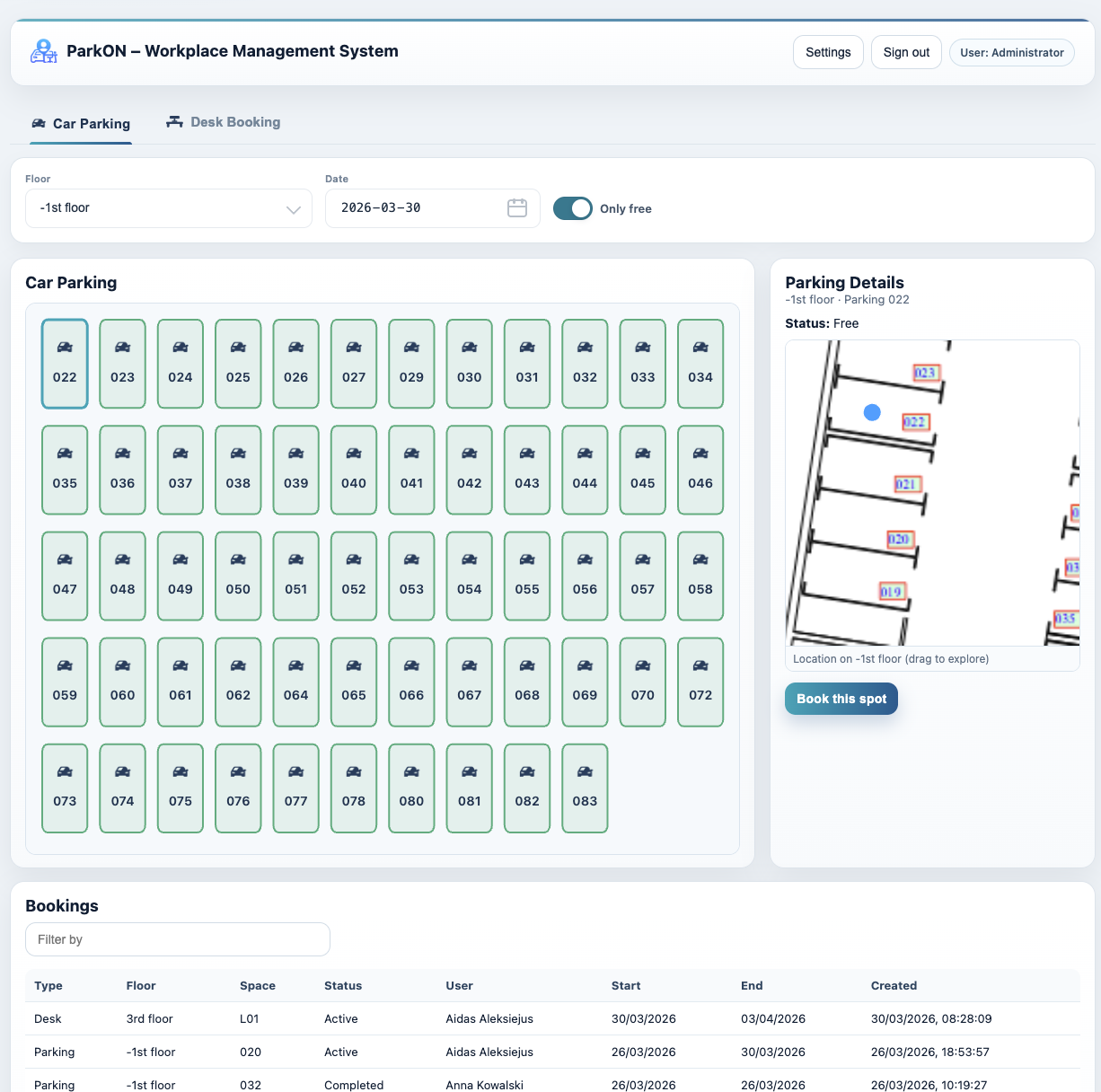
ParkON gives staff a direct route from planning an office day to securing a parking space. They choose the date, select the relevant parking floor, see current availability and reserve a specific space. Their booking then appears in their reservation view, while administrators can see employee bookings across the workplace.
HOW PARKON WORKS
Three clear steps. No side spreadsheets or message threads.
Choose the office day within the advance-booking window set by the company.
Open the parking floor, compare available spaces and select the bay that works.
The reservation is recorded and visible. If plans change, release it so someone else can use the space.
BUILT AROUND THE WORKDAY
A staff parking booking system creates a predictable routine for employees and a single source of truth for the people managing the office.
Employees can confirm parking while planning their office day, not after completing the commute.
Availability and confirmed bookings reduce the chance of multiple people claiming one bay.
Self-service booking cuts down on manual responses, lists and chat-based approvals.
Permissions and booking rules help employees understand what they can book and how far ahead.
A PRACTICAL EXAMPLE
An employee decides to work from the office next Thursday. Instead of posting a message and waiting for a reply, they open ParkON, choose Thursday and see the spaces available to them. They reserve a bay and can check the booking later from the same system. The workplace administrator can see the reservation without updating another spreadsheet.
Employees sign in, choose the date they need, view available office parking spaces and confirm a reservation. The booking remains visible to the employee and to administrators with the appropriate access.
Yes. ParkON supports advance booking, and administrators can configure how many days ahead employees are allowed to reserve.
Yes. Administrators have a clear booking view that includes the user, parking floor, space, dates and reservation status.
Yes. ParkON turns a fixed set of company parking spaces into bookable shared capacity. See the office parking management overview for the wider administrative use case.
PARKING, PLANNED
See how ParkON fits your workplace parking.